Your Telstra Plan is changing
We’re moving your services to Upfront Plans
Moving to an Upfront Plan means:
- your new plan may have a different price or data inclusion
- your existing discounts and credits may change
- the way you pay will be changing.

What's happening?

What's changing?
all upfront plans
The way you pay
With no extra data charges and a set monthly cost, you’ll pay for all your Upfront services in advance.
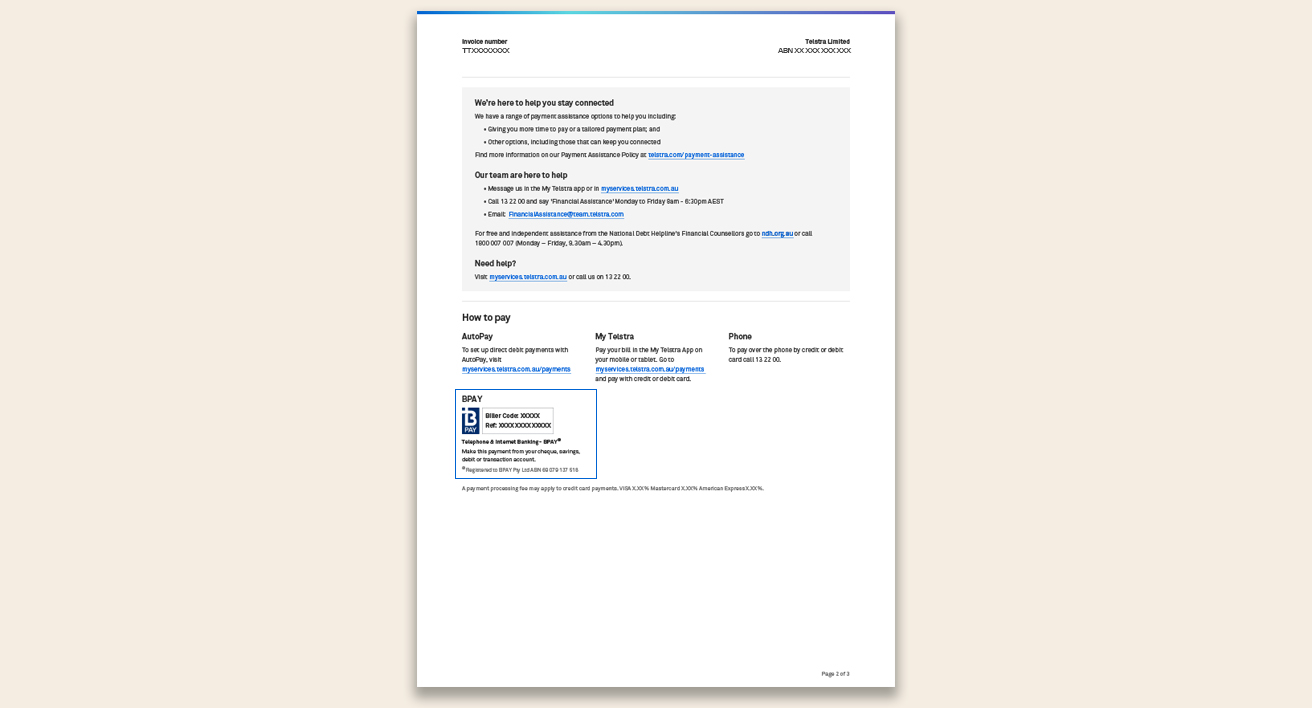
If you currently pay via direct debit, you'll pay for your Upfront Plans via AutoPay. If you currently make manual bill payments for your plans and services (e.g. BPAY, Aus Post), you'll get a new-look Telstra bill.
all upfront plans
BPAY details will change
If you pay via BPAY: For your new plan, your BPAY Biller Code will be 425132, and you'll have a new BPAY Reference Number on your next bill.
Once you move to an Upfront Plan, you'll need to start using the new BPAY details to pay for your plan.
Upfront mobile & home phone plans
International calling
Your Upfront Plan includes 30 minutes of calls for all mobile plans and home phones to standard international numbers.
If you run out of the 30 minutes of included calls, you can add an International Calling Pack to your plan to make more international calls.
Upfront Mobile & Data Plans
International roaming
Pay-as-you-go (PAYG) Roaming is no longer available. You’ll only be able to roam in selected destinations by buying an International Roaming Day Pass, which will be automatically enabled unless switched off in the My Telstra app.
What are my plan inclusions?
You can find your plan inclusions in the Critical Information Summary sheet for your plan.
Upfront Mobile Plans
Upfront Data Plans
Upfront Home Internet Plans
- 5G Internet: Upfront 5G Internet Plan
- Basic, Essential & Premium: Upfront Internet Plans Critical Information Summary
- Ultimate Plan: Upfront Ultimate Plan Critical Information Summary
- Ultrafast Plan: Upfront Ultrafast Plan Critical Information Summary
- Key Facts Sheet: Key Facts Sheet: nbn Services for Consumer (PDF, 82 KB)
Business Upfront Internet Plans
- Essential & Premium: Business Upfront Internet Plans Critical Information Summary
- Key Facts Sheet: Key Facts Sheet: nbn Services for Business (PDF, 82 KB)
Home Phone Plan
How to pay for your Upfront Plans
If you currently pay via direct debit, you'll pay for your Upfront Plans via AutoPay. If you currently make manual bill payments for your plans and services (e.g. BPAY, Aus Post), you'll get a new-look Telstra bill. Select a payment option to learn more.
AutoPay
AutoPay is a form of direct debit through which we'll automatically charge the monthly cost of your service through your selected payment method: a credit or debit card (Visa, Mastercard, or American Express) or a bank account.
Note : You'll now pay upfront for your services each month.
New Telstra bill
You can pay your Telstra bill via the MyTelstra app, through BPAY or at an Australia Post store.
Your BPAY biller code and reference number will change when you move to an Upfront Plan. Remember to change your BPAY details.
Note: You'll now pay upfront for your services each month.
You'll make multiple payments in the first month
During the switch to Upfront Plans, you may make multiple payments or get multiple bills in the first month. Don’t worry – this will only happen once.
These payments cover different billing periods:
- A bill for your old plans covering the previous billing period.
Please note: this bill will include any remaining roaming charges you need to pay. - Your first AutoPay payment or first new-look Telstra bill for the new Upfront Plans, covering the month ahead.
We're here to support you during this change
If you believe that this change may cause financial stress, you can request a payment extension after you move to an Upfront Plan.
Frequently asked questions
Priority and financial assistance
If you’re a pensioner, we have a range of concession offers for eligible healthcare card holders or valid concession card holders. If you’re having difficulty paying or your circumstances have changed, you can explore our payment assistance options.
If you’re an existing Priority Assistance customer, your status will be retained and you don’t need to take any further action.
If you recently applied for Priority Assistance, you may receive new application forms when your plan changes. You don't need to do anything if you've already sent them back. If not, you still have 75 days to return them after the plan change date.
Manage your plan
Upfront Plans are not in a contract. All our plans are month-to-month, meaning you can change once a month or cancel at any time.
You can change or cancel your services in the My Telstra app or My Telstra in a browser:
- Go to Services and choose your service
- Select View or manage your plan
- Follow the prompts to change your plan or cancel your plan.
Please note, if you’re paying off a device, any remaining payments will be charged as a lump sum when you cancel. You can find the cost of your device payout in the My Telstra app or My Telstra in a browser.
Our updated plans have MessageBank activated. To turn MessageBank off on your mobile or phone line, please follow the instructions below.
To turn MessageBank off on your mobile:
- Open the My Telstra app or My Telstra in a browser
- Navigate to Services and select your service
- Tap the three dots in the top right-hand side
- Select Manage your MessageBank to make changes
- Swipe the MessageBank toggle to off and then tap Update settings.
You can find more information about MessageBank on our MessageBank for mobiles support page.
To turn MessageBank off on your phone line:
- Lift up your phone handset
- Dial #99# to switch off MessageBank
- Hang up.
You can find more information about MessageBank on our MessageBank for phone lines support page.
Data usage
This plan comes with a data allowance to use in Australia. You won’t be charged if you go over your monthly data allowance. Instead, you can continue to access data up to speeds of 1.5Mbps. 1.5Mbps isn’t suitable for HD video or high-speed applications, and means that some web pages, social media content and files may take longer to load. In addition, heavy data users (users in the top 1% of all data users) may experience slower speeds than other users during busy periods. The speeds you actually receive may vary depending on a range of factors including your device, location, number of users and download sources. Your data allowance is for personal use in a smartphone or tablet in Australia only and the FairPlay Policy applies.
Got more questions?
Please note: We're experiencing long wait times at our call centres. We've covered the most frequently asked questions about payments on Upfront Plans on this page. If you have any of the following questions related to your move to an Upfront Plan, select the relevant link to learn more.
Related articles
International calling & roaming
Payments
Bills
Plans and accounts
Need help?
My Telstra app
View your services, pay your bill, troubleshoot tech issues, contact us via messaging and much more.
Helping you when times are tough
Depending on your level of urgency, we have flexible options that can help keep you connected.
Message us
We're here and ready to help.