Checking availability
Opticomm internet plans
Up to $270 off Opticomm internet for your business on selected plans for 6 months
With business-grade upload speeds, advanced security and more.
For new services. Offer ends 12 October. T&Cs apply.
Why choose business internet from Telstra
Flexibility
More flexibility
Choose a no-lock in plan that suits your business and change as your needs evolve. Plus bring your own modem or use ours, it’s up to you.
Security
Includes network security
All our plans come with 24/7 monitoring of our network to help protect against suspicious activity.
Step 1. Check availability
We found multiple addresses. Please select yours from the list below.
Great!
Available
You can connect to the nbn™ network via Hybrid Fibre Coaxial technology.
Looks like this address has multiple connections.
Message us to find out more about the connection and complete your order.
Great!
Available
You can connect to the nbn™ network via Fibre to the Premises technology.
Looks like this address has multiple connections.
Message us to find out more about the connection and complete your order.
Great!
Available
You can connect to the nbn™ network via Fibre to the Building technology.
We’ll check your maximum speeds later
At some addresses, we’re unable to check the maximum speeds at your address until you’re connected. While we don’t have the information at this stage, we’ll notify you of your maximum download and upload speeds once you’re on your new plan.
If the maximum speed at your address is below the maximum speed of the plan you’ve chosen, we will advise you of the options available to you which may include (i) remaining on your current plan; (ii) moving to a lower priced plan (if one is available); (iii) cancelling your plan at no cost (not available to upgrading customers). If your options include changing or cancelling your plan, you’ll receive a proportionate refund for the period you didn’t receive the full benefit of your chosen plan.
Maximum speeds at your address
-
Download speed0000 - 0000 Mbps
-
Upload speed0000 - 0000 Mbps
The maximum speed ranges are determined by the technology nbn co makes available at your business, and are the best estimate we can make of the fastest possible speeds of your connection, based on the information available. The speeds you’ll experience will usually be slower, particularly during busy periods, and may be impacted by things like your in-premises set up and wiring. We’ll use the latest information when you’re on your new plan to confirm the maximum speeds at your address.
When choosing a plan, you’ll see how the maximum speeds at your address relate to your plan options. This is important because you will not be able to experience the typical or maximum speeds of a plan if the speeds available at your address are lower.
These maximum speeds at your address shown here and in your plan options are for the existing line at the address only. If you need an additional service, we’ll notify you of the maximum and download and upload speeds of the additional line once it's connected. Do I need an additional service?
Looks like this address has multiple connections.
Message us to find out more about the connection and complete your order.
Unleash your internet potential
Great!
Available
You can connect to the nbn™ network via Fibre to the Node technology.
We’ll check your maximum speeds later
At some addresses, we’re unable to check the maximum speeds at your address until you’re connected. While we don’t have the information at this stage, we’ll notify you of your maximum download and upload speeds once you’re on your new plan.
If the maximum speed at your address is below the maximum speed of the plan you’ve chosen, we will advise you of the options available to you which may include (i) remaining on your current plan; (ii) moving to a lower priced plan (if one is available); (iii) cancelling your plan at no cost (not available to upgrading customers). If your options include changing or cancelling your plan, you’ll receive a proportionate refund for the period you didn’t receive the full benefit of your chosen plan.
Maximum speeds at your address
-
Download speed0000 - 0000 Mbps
-
Upload speed0000 - 0000 Mbps
The maximum speed ranges are determined by the technology nbn co makes available at your business, and are the best estimate we can make of the fastest possible speeds of your connection, based on the information available. The speeds you’ll experience will usually be slower, particularly during busy periods, and may be impacted by things like your in-premises set up and wiring. We’ll use the latest information when you’re on your new plan to confirm the maximum speeds at your address.
When choosing a plan, you’ll see how the maximum speeds at your address relate to your plan options. This is important because you will not be able to experience the typical or maximum speeds of a plan if the speeds available at your address are lower.
These maximum speeds at your address shown here and in your plan options are for the existing line at the address only. If you need an additional service, we’ll notify you of the maximum and download and upload speeds of the additional line once it's connected. Do I need an additional service?
Looks like this address has multiple connections.
Message us to find out more about the connection and complete your order.
Unleash your internet potential
Great!
Available
You can connect to the nbn™ network via Fibre to the Curb technology.
We’ll check your maximum speeds later
At some addresses, we’re unable to check the maximum speeds at your address until you’re connected. While we don’t have the information at this stage, we’ll notify you of your maximum download and upload speeds once you’re on your new plan.
If the maximum speed at your address is below the maximum speed of the plan you’ve chosen, we will advise you of the options available to you which may include (i) remaining on your current plan; (ii) moving to a lower priced plan (if one is available); (iii) cancelling your plan at no cost (not available to upgrading customers). If your options include changing or cancelling your plan, you’ll receive a proportionate refund for the period you didn’t receive the full benefit of your chosen plan.
Maximum speeds at your address
-
Download speed0000 - 0000 Mbps
-
Upload speed0000 - 0000 Mbps
The maximum speed ranges are determined by the technology nbn co makes available at your business, and are the best estimate we can make of the fastest possible speeds of your connection, based on the information available. The speeds you’ll experience will usually be slower, particularly during busy periods, and may be impacted by things like your in-premises set up and wiring. We’ll use the latest information when you’re on your new plan to confirm the maximum speeds at your address.
When choosing a plan, you’ll see how the maximum speeds at your address relate to your plan options. This is important because you will not be able to experience the typical or maximum speeds of a plan if the speeds available at your address are lower.
These maximum speeds at your address shown here and in your plan options are for the existing line at the address only. If you need an additional service, we’ll notify you of the maximum and download and upload speeds of the additional line once it's connected. Do I need an additional service?
Looks like this address has multiple connections.
Message us to find out more about the connection and complete your order.
Unleash your internet potential
Great!
Available
You can connect to the nbn™ network via Fixed Wireless technology.
Looks like this address has multiple connections.
Message us to find out more about the connection and complete your order.
Great!
Available
You can connect to the Opticomm access network. Please call us on 13 22 00 to find out more and connect.
Looks like this address has multiple connections.
Message us to find out more about the connection and complete your order.
Great! You can get connected via Cable now
Available
Our cable plans are nbn-ready so you can switch easily when the nbn arrives. For updates check the nbn rollout map.
Our cable plans are nbn-ready so you can switch easily when the nbn arrives. For updates check the nbn rollout map.
To connect to CABLE, contact our messaging team.
Looks like this address has multiple connections.
Message us to find out more about the connection and complete your order.
Great! You can get connected via ADSL now
Available
Our ADSL plans are nbn-ready so you can switch easily when the nbn arrives. For updates check the nbn rollout map.
Our ADSL plans are nbn-ready so you can switch easily when the nbn arrives. For updates check the nbn rollout map.
To connect to ADSL, contact our messaging team.
Looks like this address has multiple connections.
Message us to find out more about the connection and complete your order.
Great!
Available
You can connect to the Opticomm access network.
Looks like this address has multiple connections.
Message us to find out more about the connection and complete your order.
Email my results
Our nbn, ADSL and cable plans are currently unavailable in your area.
Thanks for providing your address.
Step 2. Choose your business plan
What type of business plan do you need?
-
Essential $25 off for 6 mths
Free fibre upgrade availableFree fibre upgrade requiredFree fibre upgrade availableFree fibre upgrade required$100 /mth
For 6 months, then $125/mth.
For new services. Ends 12 October.Plan price may change.50Typical speeds (9am-5pm weekdays)-
50 MbpsDownload
-
17 MbpsUpload
Speeds experienced may be lower due to factors including your modem and cabling, in-premises set up/wiring.
Speeds experienced may be lower due to factors incl. in-premises set up/wiring and will be confirmed post connection.Speeds experienced may be lower due to factors incl. in-premise set up/wiring and will be confirmed post connection.Typical speeds not available to most FTTN connections. Speeds experienced may be lower due to factors incl. in-premise set up/wiring and will be confirmed post connection.Speeds experienced may be lower due to factors incl. in-premise set up/wiring.Speeds experienced may be lower due to factors incl. in-premise set up/wiring.Your cable speeds will depend on your location. We’ll confirm yours once you’re connected.Your ADSL speeds will depend on your location. We’ll confirm yours once you’re connected.2-55 Mbps typical download speeds (7pm - 11pm). Around 50% of customers achieve download speeds greater than 25 Mbps (7pm-11pm).
Speeds experienced may be slower, and will vary throughout the day due to factors including the signal strength or obstruction of the antenna’s line of sight to the tower, weather conditions, tower and network capacity, and in-premise setup; and actual speeds may be significantly impacted by congestion, particularly during the busy hours (7-11pm).
We're still calculating typical upload speeds 9am-5pm weekdays on this plan - the information here is an estimate only.
Speeds experienced may be lower due to factors including your modem and cabling, in-premises set up/wiring. Plan available on FTTP and HFC connections only.We're still calculating typical upload speeds 9am-5pm weekdays on this plan - the information here is an estimate only.
Speeds experienced may be lower due to factors including your modem and cabling, in-premises set up/wiring. Plan available on FTTP and HFC connections only.Maximum speeds at your address on this plan:
-
MbpsDownload
-
MbpsUpload
We recommend a lower plan as this plan’s maximum download speed is 50 and your nbn connection supports a maximum download speed below 25Mbps.
If your maximum upload speed is higher than 4Mbps you may still experience faster upload speeds on this plan compared to the plan below.
This plan’s maximum download speed is 50. You won’t be able to achieve this speed. Your nbn connection supports a maximum download speed of .
This plan’s maximum download speed is 50. Your nbn connection supports this download speed.
This plan’s maximum download speed is 50. Your nbn connection supports this download speed. Faster download speeds may be reached on a higher plan.
This plan’s maximum download speed is 50. Your nbn connection supports this download speed. Faster download speeds may be reached on a higher plan.
Speeds experienced may be lower due to factors including your modem and cabling, in-premises set up/wiring.Speeds experienced may be lower due to factors including your modem and cabling, in-premises set up/wiring.Speeds experienced may be lower due to factors including your modem and cabling, in-premises set up/wiring.Typical speeds not avail. to most FTTN connections. Speeds experienced may be lower due to factors including your modem and cabling, in-premises set up/wiring.Great for:
SD video conferencing while your team share files, collaborate online and stream.Best uses for Essential -
-
Pro Fast $25 off for 6 mths
Free fibre upgrade availableFree fibre upgrade requiredFree fibre upgrade availableFree fibre upgrade required$100 /mth
For 6 months, then $125/mth.
For new services. Ends 12 October.Plan price may change.250Typical speeds (9am-5pm weekdays)-
250 MbpsDownload
-
80 MbpsUpload
We're still calculating typical upload speeds 9am-5pm weekdays on this plan - the information here is an estimate only.
Speeds experienced may be lower due to factors including your modem and cabling, in-premises set up/wiring. Plan available on FTTP and HFC connections only.
We're still calculating typical upload speeds 9am-5pm weekdays on this plan - the information here is an estimate only.
Speeds experienced may be lower due to factors including your modem and cabling, in-premises set up/wiring. Plan available on FTTP and HFC connections only.
We're still calculating typical upload speeds 9am-5pm weekdays on this plan - the information here is an estimate only.
Speeds experienced may be lower due to factors including your modem and cabling, in-premises set up/wiring. Plan available on FTTP and HFC connections only.
We're still calculating typical upload speeds 9am-5pm weekdays on this plan - the information here is an estimate only.
Speeds experienced may be lower due to factors including your modem and cabling, in-premises set up/wiring. Plan available on FTTP and HFC connections only.
Your cable speeds will depend on your location. We’ll confirm yours once you’re connected.Your ADSL speeds will depend on your location. We’ll confirm yours once you’re connected.We're still calculating typical upload speeds 9am-5pm weekdays on this plan - the information here is an estimate only.
Speeds experienced may be lower due to factors including your modem and cabling, in-premises set up/wiring. Plan available on FTTP and HFC connections only.
We're still calculating typical upload speeds 9am-5pm weekdays on this plan - the information here is an estimate only.
Speeds experienced may be lower due to factors including your modem and cabling, in-premises set up/wiring. Plan available on FTTP and HFC connections only.We're still calculating typical upload speeds 9am-5pm weekdays on this plan - the information here is an estimate only.
Speeds experienced may be lower due to factors including your modem and cabling, in-premises set up/wiring. Plan available on FTTP and HFC connections only.Maximum speeds at your address on this plan:
-
MbpsDownload
-
MbpsUpload
This plan’s maximum download speed is not supported at your address. Find out whyThis plan’s maximum download speed is supported at your address.We're still calculating typical upload speeds 9am-5pm weekdays on this plan - the information here is an estimate only.
Speeds experienced may be lower due to factors including your modem and cabling, in-premises set up/wiring. Plan available on FTTP and HFC connections only.
Great for:
Smooth video conferencing while your team shares large files fast and work across cloud apps.Best uses for Pro Fast -
-
Essential Internet Only $15 off for 6 mths
Free fibre upgrade availableFree fibre upgrade requiredFree fibre upgrade availableFree fibre upgrade required$95 /mth
For 6 months, then $110/mth.
For new services. Ends 12 October.Plan price may change.50Typical speeds (9am-5pm weekdays)-
50 MbpsDownload
-
17 MbpsUpload
We’re still calculating typical busy period speeds 9am - 5pm weekdays on this plan - the information here is an estimate only.Speeds experienced may be lower due to factors including your modem and cabling, in-premises set up/wiring.
Speeds experienced may be lower due to factors incl. in-premises set up/wiring and will be confirmed post connection.Speeds experienced may be lower due to factors incl. in-premise set up/wiring and will be confirmed post connection.Typical speeds not available to most FTTN connections. Speeds experienced may be lower due to factors incl. in-premise set up/wiring and will be confirmed post connection.We’re still calculating typical busy period speeds 9am - 5pm weekdays on this plan - the information here is an estimate only.
Speeds experienced may be lower due to factors incl. in-premise set up/wiring.We’re still calculating typical busy period speeds 9am - 5pm weekdays on this plan - the information here is an estimate only.
Speeds experienced may be lower due to factors incl. in-premise set up/wiring.We’re still calculating typical busy period speeds 9am - 5pm weekdays on this plan - the information here is an estimate only.
Speeds experienced may be lower due to factors incl. in-premise set up/wiring.We’re still calculating typical busy period speeds 9am - 5pm weekdays on this plan - the information here is an estimate only.
Speeds experienced may be lower due to factors incl. in-premise set up/wiring.We're still calculating typical upload speeds 9am-5pm weekdays on this plan - the information here is an estimate only.
Speeds experienced may be lower due to factors including your modem and cabling, in-premises set up/wiring. Plan available on FTTP and HFC connections only.Maximum speeds at your address on this plan:
-
MbpsDownload
-
MbpsUpload
We recommend a lower plan as this plan’s maximum download speed is 50 and your nbn connection supports a maximum download speed below 25Mbps.
If your maximum upload speed is higher than 4Mbps you may still experience faster upload speeds on this plan compared to the plan below.
This plan’s maximum download speed is 50. You won’t be able to achieve this speed. Your nbn connection supports a maximum download speed of .
This plan’s maximum download speed is 50. Your nbn connection supports this download speed.
This plan’s maximum download speed is 50. Your nbn connection supports this download speed. Faster download speeds may be reached on a higher plan.
This plan’s maximum download speed is 50. Your nbn connection supports this download speed. Faster download speeds may be reached on a higher plan.
Speeds experienced may be lower due to factors including your modem and cabling, in-premises set up/wiring.Speeds experienced may be lower due to factors including your modem and cabling, in-premises set up/wiring.Speeds experienced may be lower due to factors including your modem and cabling, in-premises set up/wiring.Typical speeds not avail. to most FTTN connections. Speeds experienced may be lower due to factors including your modem and cabling, in-premises set up/wiring.Great for:
SD video conferencing while your team share files, collaborate online and stream.Best uses for Essential-
Internet only. No additional plan features.
-
-
Pro Fast Internet Only $15 off for 6 mths
Free fibre upgrade availableFree fibre upgrade requiredFree fibre upgrade availableFree fibre upgrade required$95 /mth
For 6 months, then $110/mth.
For new services. Ends 12 October.Plan price may change.250Typical speeds (9am-5pm weekdays)-
250 MbpsDownload
-
80 MbpsUpload
We're still calculating typical busy period speeds 9am-5pm weekdays on this plan - the information here is an estimate only.
Speeds experienced may be lower due to factors including your modem and cabling, in-premises set up/wiring. Plan available on FTTP and HFC connections only.We're still calculating typical busy period speeds 9am-5pm weekdays on this plan - the information here is an estimate only.
Speeds experienced may be lower due to factors including your modem and cabling, in-premises set up/wiring. Plan available on FTTP and HFC connections only.We're still calculating typical busy period speeds 9am-5pm weekdays on this plan - the information here is an estimate only.
Speeds experienced may be lower due to factors including your modem and cabling, in-premises set up/wiring. Plan available on FTTP and HFC connections only.
We're still calculating typical busy period speeds 9am-5pm weekdays on this plan - the information here is an estimate only.
Speeds experienced may be lower due to factors including your modem and cabling, in-premises set up/wiring. Plan available on FTTP and HFC connections only.
Your cable speeds will depend on your location. We’ll confirm yours once you’re connected.Your ADSL speeds will depend on your location. We’ll confirm yours once you’re connected.We're still calculating typical busy period speeds 9am-5pm weekdays on this plan - the information here is an estimate only.
Speeds experienced may be lower due to factors including your modem and cabling, in-premises set up/wiring. Plan available on FTTP and HFC connections only.
We're still calculating typical busy period speeds 9am-5pm weekdays on this plan - the information here is an estimate only.
Speeds experienced may be lower due to factors including your modem and cabling, in-premises set up/wiring. Plan available on FTTP and HFC connections only.We're still calculating typical busy period speeds 9am-5pm weekdays on this plan - the information here is an estimate only.
Speeds experienced may be lower due to factors including your modem and cabling, in-premises set up/wiring. Plan available on FTTP and HFC connections only.Maximum speeds at your address on this plan:
-
MbpsDownload
-
MbpsUpload
This plan’s maximum download speed is not supported at your address. Find out whyThis plan’s maximum download speed is supported at your address.We're still calculating typical busy period speeds 9am-5pm weekdays on this plan - the information here is an estimate only.
Speeds experienced may be lower due to factors including your modem and cabling, in-premises set up/wiring. Plan available on FTTP and HFC connections only.
Great for:
Smooth video conferencing while your team shares large files fast and work across cloud apps.Best uses for Pro Fast-
Internet only. No additional plan features.
-
-
Pro Superfast $35 off for 6 mths
Free fibre upgrade availableFree fibre upgrade requiredFree fibre upgrade availableFree fibre upgrade required$110 /mth
For 6 months, then $145/mth.
For new services. Ends 12 October.Plan price may change.500Typical speeds (9am-5pm weekdays)-
500 MbpsDownload
-
160 MbpsUpload
We're still calculating typical upload speeds 9am-5pm weekdays on this plan - the information here is an estimate only.
Speeds experienced may be lower due to factors including your modem and cabling, in-premises set up/wiring. Plan available on FTTP connections only.
We're still calculating typical upload speeds 9am-5pm weekdays on this plan - the information here is an estimate only.
Speeds experienced may be lower due to factors including your modem and cabling, in-premises set up/wiring. Plan available on FTTP connections only.
We're still calculating typical upload speeds 9am-5pm weekdays on this plan - the information here is an estimate only.
Speeds experienced may be lower due to factors including your modem and cabling, in-premises set up/wiring. Plan available on FTTP connections only.
We're still calculating typical upload speeds 9am-5pm weekdays on this plan - the information here is an estimate only.
Speeds experienced may be lower due to factors including your modem and cabling, in-premises set up/wiring. Plan available on FTTP connections only.
Your cable speeds will depend on your location. We’ll confirm yours once you’re connected.Your ADSL speeds will depend on your location. We’ll confirm yours once you’re connected.We're still calculating typical upload speeds 9am-5pm weekdays on this plan - the information here is an estimate only.
Speeds experienced may be lower due to factors including your modem and cabling, in-premises set up/wiring. Plan available on FTTP connections only.
We're still calculating typical upload speeds 9am-5pm weekdays on this plan - the information here is an estimate only.
Speeds experienced may be lower due to factors including your modem and cabling, in-premises set up/wiring. Plan available on FTTP and HFC connections only.We're still calculating typical upload speeds 9am-5pm weekdays on this plan - the information here is an estimate only.
Speeds experienced may be lower due to factors including your modem and cabling, in-premises set up/wiring. Plan available on FTTP and HFC connections only.Maximum speeds at your address on this plan:
-
MbpsDownload
-
MbpsUpload
This plan’s maximum download speed is not supported at your address. Find out whyThis plan’s maximum download speed is supported at your address.We're still calculating typical upload speeds 9am-5pm weekdays on this plan - the information here is an estimate only.
Speeds experienced may be lower due to factors including your modem and cabling, in-premises set up/wiring. Plan available on FTTP connections only.
Great for:
Smoother quality video conferencing while your team shares large files very fast and work frequently across cloud apps.Best uses for Pro Superfast -
-
Pro Superfast Internet Only $24 off for 6 mths
Free fibre upgrade availableFree fibre upgrade requiredFree fibre upgrade availableFree fibre upgrade required$105 /mth
For 6 months, then $129/mth.
For new services. Ends 12 October.Plan price may change.500Typical speeds (9am-5pm weekdays)-
500 MbpsDownload
-
160 MbpsUpload
We're still calculating typical busy period speeds 9am-5pm weekdays on this plan - the information here is an estimate only.
Speeds experienced may be lower due to factors including your modem and cabling, in-premises set up/wiring. Plan available on FTTP connections only.
We're still calculating typical busy period speeds 9am-5pm weekdays on this plan - the information here is an estimate only.
Speeds experienced may be lower due to factors including your modem and cabling, in-premises set up/wiring. Plan available on FTTP connections only.
We're still calculating typical busy period speeds 9am-5pm weekdays on this plan - the information here is an estimate only.
Speeds experienced may be lower due to factors including your modem and cabling, in-premises set up/wiring. Plan available on FTTP connections only.
We're still calculating typical busy period speeds 9am-5pm weekdays on this plan - the information here is an estimate only.
Speeds experienced may be lower due to factors including your modem and cabling, in-premises set up/wiring. Plan available on FTTP connections only.
Your cable speeds will depend on your location. We’ll confirm yours once you’re connected.Your ADSL speeds will depend on your location. We’ll confirm yours once you’re connected.We're still calculating typical busy period speeds 9am-5pm weekdays on this plan - the information here is an estimate only.
Speeds experienced may be lower due to factors including your modem and cabling, in-premises set up/wiring. Plan available on FTTP connections only.
We're still calculating typical busy period speeds 9am-5pm weekdays on this plan - the information here is an estimate only.
Speeds experienced may be lower due to factors including your modem and cabling, in-premises set up/wiring. Plan available on FTTP and HFC connections only.We're still calculating typical busy period speeds 9am-5pm weekdays on this plan - the information here is an estimate only.
Speeds experienced may be lower due to factors including your modem and cabling, in-premises set up/wiring. Plan available on FTTP and HFC connections only.Maximum speeds at your address on this plan:
-
MbpsDownload
-
MbpsUpload
This plan’s maximum download speed is not supported at your address. Find out whyThis plan’s maximum download speed is supported at your address.We're still calculating typical busy period speeds 9am-5pm weekdays on this plan - the information here is an estimate only.
Speeds experienced may be lower due to factors including your modem and cabling, in-premises set up/wiring. Plan available on FTTP connections only.
Great for:
Smoother quality video conferencing while your team shares large files very fast and work frequently across cloud apps.Best uses for Pro Superfast-
Internet only. No additional plan features.
-
-
Pro Ultrafast $45 off for 6 mths
Free fibre upgrade availableFree fibre upgrade requiredFree fibre upgrade availableFree fibre upgrade required$130 /mth
For 6 months, then $175/mth.
For new services. Ends 12 October.Plan price may change.1000Typical speeds (9am-5pm weekdays)-
815 MbpsDownload
-
320 MbpsUpload
We're still calculating typical upload speeds 9am-5pm weekdays on this plan - the information here is an estimate only.
Speeds experienced may be lower due to factors including your modem and cabling, in-premises set up/wiring. Plan available on FTTP connections only.
We're still calculating typical upload speeds 9am-5pm weekdays on this plan - the information here is an estimate only.
Speeds experienced may be lower due to factors including your modem and cabling, in-premises set up/wiring. Plan available on FTTP connections only.
We're still calculating typical upload speeds 9am-5pm weekdays on this plan - the information here is an estimate only.
Speeds experienced may be lower due to factors including your modem and cabling, in-premises set up/wiring. Plan available on FTTP connections only.
We're still calculating typical upload speeds 9am-5pm weekdays on this plan - the information here is an estimate only.
Speeds experienced may be lower due to factors including your modem and cabling, in-premises set up/wiring. Plan available on FTTP connections only.
Your cable speeds will depend on your location. We’ll confirm yours once you’re connected.Your ADSL speeds will depend on your location. We’ll confirm yours once you’re connected.We're still calculating typical upload speeds 9am-5pm weekdays on this plan - the information here is an estimate only.
Speeds experienced may be lower due to factors including your modem and cabling, in-premises set up/wiring. Plan available on FTTP connections only.
We're still calculating typical upload speeds 9am-5pm weekdays on this plan - the information here is an estimate only.
Speeds experienced may be lower due to factors including your modem and cabling, in-premises set up/wiring. Plan available on FTTP and HFC connections only.We're still calculating typical upload speeds 9am-5pm weekdays on this plan - the information here is an estimate only.
Speeds experienced may be lower due to factors including your modem and cabling, in-premises set up/wiring. Plan available on FTTP and HFC connections only.Maximum speeds at your address on this plan:
-
MbpsDownload
-
MbpsUpload
This plan’s maximum download speed is not supported at your address. Find out whyThis plan’s maximum download speed is supported at your address.We're still calculating typical upload speeds 9am-5pm weekdays on this plan - the information here is an estimate only.
Speeds experienced may be lower due to factors including your modem and cabling, in-premises set up/wiring. Plan available on FTTP connections only.
Great for:
Seamless high-quality video conferencing while your team shares large files extremely fast and work heavily across cloud apps.Best uses for Pro Ultrafast -
-
Pro Ultrafast Internet Only $35 off for 6 mths
Free fibre upgrade availableFree fibre upgrade requiredFree fibre upgrade availableFree fibre upgrade required$124 /mth
For 6 months, then $159/mth.
For new services. Ends 12 October.Plan price may change.1000Typical speeds (9am-5pm weekdays)-
815 MbpsDownload
-
320 MbpsUpload
We're still calculating typical busy period speeds 9am-5pm weekdays on this plan - the information here is an estimate only.
Speeds experienced may be lower due to factors including your modem and cabling, in-premises set up/wiring. Plan available on FTTP connections only.
We're still calculating typical busy period speeds 9am-5pm weekdays on this plan - the information here is an estimate only.
Speeds experienced may be lower due to factors including your modem and cabling, in-premises set up/wiring. Plan available on FTTP connections only.
We're still calculating typical busy period speeds 9am-5pm weekdays on this plan - the information here is an estimate only.
Speeds experienced may be lower due to factors including your modem and cabling, in-premises set up/wiring. Plan available on FTTP connections only.
We're still calculating typical busy period speeds 9am-5pm weekdays on this plan - the information here is an estimate only.
Speeds experienced may be lower due to factors including your modem and cabling, in-premises set up/wiring. Plan available on FTTP connections only.
Your cable speeds will depend on your location. We’ll confirm yours once you’re connected.Your ADSL speeds will depend on your location. We’ll confirm yours once you’re connected.We're still calculating typical busy period speeds 9am-5pm weekdays on this plan - the information here is an estimate only.
Speeds experienced may be lower due to factors including your modem and cabling, in-premises set up/wiring. Plan available on FTTP connections only.
We're still calculating typical busy period speeds 9am-5pm weekdays on this plan - the information here is an estimate only.
Speeds experienced may be lower due to factors including your modem and cabling, in-premises set up/wiring. Plan available on FTTP and HFC connections only.We're still calculating typical busy period speeds 9am-5pm weekdays on this plan - the information here is an estimate only.
Speeds experienced may be lower due to factors including your modem and cabling, in-premises set up/wiring. Plan available on FTTP and HFC connections only.Maximum speeds at your address on this plan:
-
MbpsDownload
-
MbpsUpload
This plan’s maximum download speed is not supported at your address. Find out whyThis plan’s maximum download speed is supported at your address.We're still calculating typical busy period speeds 9am-5pm weekdays on this plan - the information here is an estimate only.
Speeds experienced may be lower due to factors including your modem and cabling, in-premises set up/wiring. Plan available on FTTP connections only.
Great for:
Seamless high-quality video conferencing while your team shares large files extremely fast and work heavily across cloud apps.Best uses for Pro Ultrafast-
Internet only. No additional plan features.
-
Step 3. Would you like to add a modem?
You can buy a Telstra Smart Modem 4 or you can choose to bring your own compatible modem. Learn more about BYO modem compatibility.
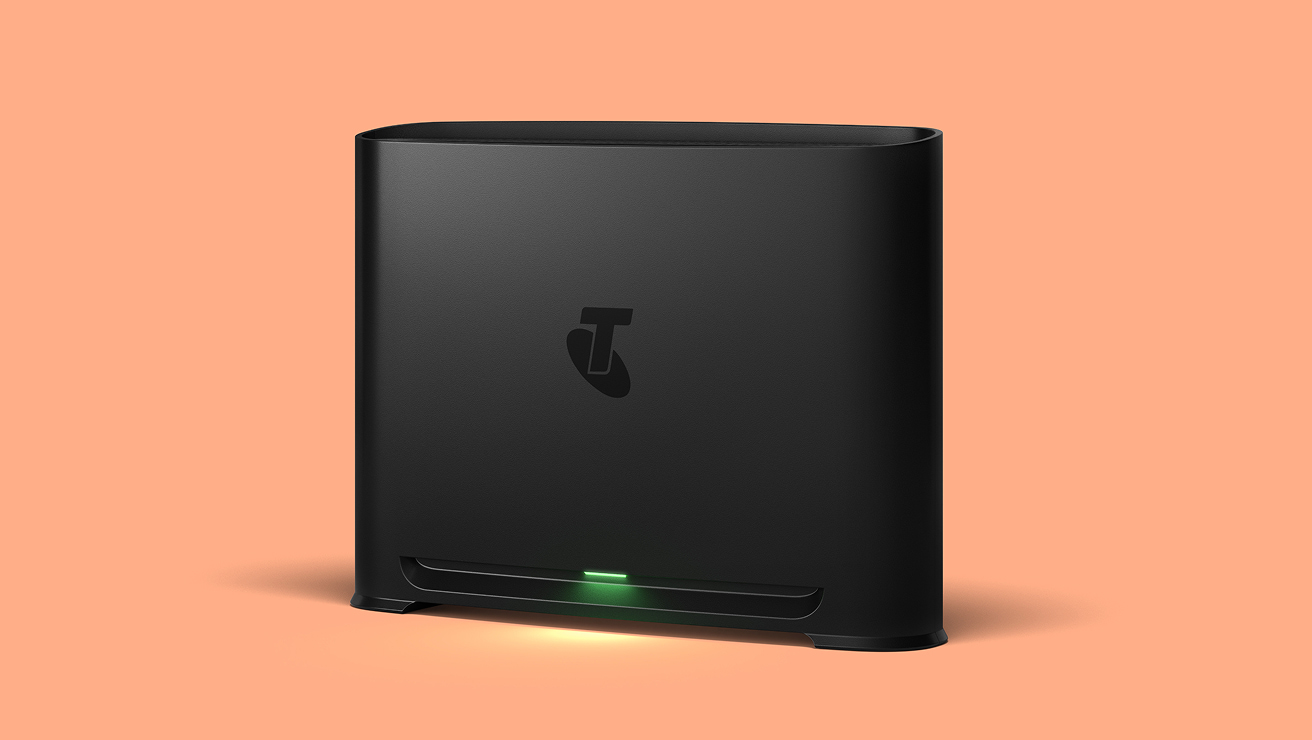
Telstra Smart Modem™
Your business moves fast. You need a modem that keeps up.
-
Next-gen Wi-Fi 7 technology for Wi-Fi 7 devices
-
Advanced security to keep your business safer online
-
Easy set-up in minutes
-
2GB of RAM to easily handle over 250 devices
$288
In stock
Available now with free delivery
Bringing your own modem?
Your choice of modem/router, and how you set it up within your premises, could limit you from utilising the maximum speeds of your broadband plan.
If you're using your own modem, we won't know if it supports the full speed of your selected plan. Please check your modem's label, instruction manual or the modem manufacturer's website.
If you have a non-Telstra smart modem you may not be able to utilise the maximum speeds of the plan you have selected. You can check your modem's compatibility.
Bringing your own modem?
Your choice of modem/router, and how you set it up within your premises, could limit you from utilising the maximum speeds of your broadband plan.
If you're using your own modem, we won't know if it supports the full speed of your selected plan. Please check your modem's label, instruction manual or the modem manufacturer's website.
If you have a non-Telstra smart modem you may not be able to utilise the maximum speeds of the plan you have selected. You can check your modem's compatibility.
Total in cart
$/mth
$ one-off
$ one-off
Your original discount offer still applies. Monthly discount may end early if you change plans.
If you choose the lower speed Basic 5G plan now, you won’t be able to upgrade to a higher speed plan at this time. The ability to upgrade may become available at a later date.
 Go to checkout
Something went wrong. Please try again.
Switching to us is easy
-
Pick your perfect plan
To find the right Telstra Opticomm plan for your home, enter your address.
-
Get fast, free delivery
Your Smart Modem will arrive in just 1-3 days metro and up to 5 in rural areas. Track your order anytime.
-
Fast, easy setup
Follow the easy setup modem guide or download the app and you’ll be connected in minutes.
Frequently asked questions
Opticomm is a wholesale broadband provider that specialises in Fibre to the Premises (FTTP) internet mainly for new or recently developed housing estates. Opticomm is wholly owned by Uniti Group Limited.
Telstra is an Opticomm provider, which means we provide Home Internet plans to personal customers via Opticomm’s wholesale Fibre (FTTP) network.
The National Broadband Network (nbn®) is owned by the Australian government and reaches 99% of Australian properties via a mix of nbn technologies. Whereas Opticomm is a privately owned company that offers only fast fibre (FTTP) technology, to customers who live in an estate or apartment complex connected to the Opticomm access network.
Generally you can’t choose between connecting to the nbn or the Opticomm network because they don’t overlap coverage.
Yes, Opticomm plan inclusions are the same as our other internet plans, including:
Telstra Smart Modem 4 with mobile network backup on eligible plans, included for use with your plan
Calling number display, Call Line identification, CLI blocking, Messagebank, Call waiting / forward/ return
Choice for directory listing
Phone line available on eligible plans only.
What about the speeds?
Learn about the Opticomm access network speeds from Telstra
If you are on an eligible business internet plan with Telstra Smart Modem included for use, we'll send you a new modem if you need one - along with easy self-install instructions. If you have purchased a Telstra Smart Modem outright with Business Internet Only plan, it will also come come with simple steps to install it yourself.
If you have purchased an Internet Only plan without a Telstra Smart Modem, Telstra may not be able to assist with third-party modem installation.
No, all Telstra Opticomm plans come with unlimited data.
Fair use policy applies.
Once you’ve placed your order, your modem should arrive within 1-3 days metro and up to 5 days regional. You can set up your modem in minutes, and that’s it – you’ll be switched.
Opticomm’s Fibre to the Premises (FTTP) technology supports faster internet speeds, which means you may be able to enjoy our fastest available plans like Superfast and Ultrafast - ideal for heavy streaming, gaming, and large file downloads.
Learn about the Opticomm access network speeds from Telstra
Yes, in most cases you will still be able to keep the same Telstra plan, your Telstra Smart Modem and any extras you have with us. You can also keep your phone number.
Your existing Telstra Smart Modem will simply connect to the Opticomm fibre terminal.
We’ve moved all our old Velocity customers on to the Opticomm network, and no longer offer Telstra Velocity plans. As an Opticomm provider, we now offer fast-fibre Telstra Opticomm plans instead.
Yes. If you or someone living with you may be at risk without access to a working home phone, you could be eligible for Priority Assistance.
A static IP address is a consistent IP address assigned to you. It allows you to control aspects of how you and the devices on your network communicate via the internet.
Things you need to know
Important
Your fixed broadband service can never go faster than the maximum line speed available at your premises, so for FTTN/B/C customers we will confirm your maximum attainable speed after connection and let you know if your line is not able to achieve the maximum speed of your plan.
The ‘typical busy period speeds’ are not measures of customers’ actual in-premises speeds, which may be slower. Not all customers receive these speeds.
Find out more about speeds on the Telstra customers on the nbn & Opticomm access network.
Plan prices
Your plan and add-ons may change (including price and inclusions). If you don’t like a change, you can change your plan or cancel your plan or add-ons. If you cancel, just pay out your device, accessories and services in full.
High speeds
Typical busy period speeds for Business Pro Fast, Pro Superfast and Pro Ultrafast are an estimate only. We do not have sufficient data yet to calculate the typical busy period speeds. We're still calculating typical busy period upload speeds 9am-5pm, weekdays on this plan - the information here is an estimate only. Speeds experienced may be lower due to factors incl. modem and cabling and in-home set up/wiring. For ordinary personal domestic use. For important information on speeds see nbn key facts sheet (PDF, 81KB) or Opticomm key facts sheet (PDF, 39.8KB).
Service Availability
Services not available to all areas or premises.
New Development Charge
If you’re in a new development without existing phone or internet infrastructure, Opticomm may impose a $300 New Development Charge (NDC) to connect you to the Opticomm access network. This includes new lots, subdivisions, and granny flats with a separate address from the primary residence. If applicable, we will bill that charge to you and we will let you know at the time of confirming your order and you will have the option to cancel. Extra charges may apply for non-standard or professional installation of Telstra or Opticomm and for premises in new developments. Once you are connected to nbn fibre, you won’t be able to move to our copper network.
Medical security alarms, lift phones and fire indicator panels
If you have alarms such as back-to-base security alarm or medi-alert connected to your phone service, it’s important you contact your medical or security provider to check if they’re compatible with the service and identify what alternatives are available. Internet Only plans do not include a phone service or support Priority Assistance. If you need a phone line choose another plan type.
nbn®, nbn co and other nbn® logos and brands are registered trade marks of nbn co limited and used under licence.
Important
Your fixed broadband service can never go faster than the maximum line speed available at your premises, so for FTTN/B/C customers we will confirm your maximum attainable speed after connection and let you know if your line is not able to achieve the maximum speed of your plan.
The ‘typical busy period speeds’ are not measures of customers’ actual in-premises speeds, which may be slower. Not all customers receive these speeds.
Find out more about speeds on the Telstra customers on the nbn & Opticomm access network.
Plan prices
Your plan and add-ons may change (including price and inclusions). If you’re not happy, you can change your plan or cancel your plan or add-ons. If you cancel, change to a plan without voice or to a different tech type, within 24 months, simply return your modem or pay a $200 non-return fee.
High speeds
Typical busy period speeds for Business Pro Fast, Pro Superfast and Pro Ultrafast are an estimate only. We do not have sufficient data yet to calculate the typical busy period speeds. We're still calculating typical busy period upload speeds 9am-5pm, weekdays on this plan - the information here is an estimate only. Speeds experienced may be lower due to factors incl. modem and cabling and in-home set up/wiring. For ordinary personal domestic use. For important information on speeds see nbn key facts sheet (PDF, 81KB) or Opticomm key facts sheet (PDF, 39.8KB).
Service Availability
Services not available to all areas or premises.
Installation
Standard installation includes self-installation of your modem, eligibility criteria applies. Extra charges apply for non-standard installation of Telstra, nbn co or Opticomm supplied equipment and for premises in new developments.
New Development Charge
If you’re in a new development without existing phone or internet infrastructure, Opticomm may impose a $300 New Development Charge (NDC) to connect you to the Opticomm access network. This includes new lots, subdivisions, and granny flats with a separate address from the primary residence. If applicable, we will bill that charge to you and we will let you know at the time of confirming your order and you will have the option to cancel. Extra charges may apply for non-standard or professional installation of Telstra or Opticomm and for premises in new developments. Once you are connected to nbn fibre, you won’t be able to move to our copper network.
Mobile network backup with Telstra Smart Modem 4
Mobile backup is available to premises in mobile coverage areas. Check coverage at telstra.com/coverage. In the event of a fault on the nbn or Opticomm access network, our Smart Modem can switch your service to our mobile network automatically. We’ll switch your service back to the nbn when the fault is resolved.
The mobile network backup service is uncapped and unshaped when there’s a fault. This means there is no limit on data allowance or speed, and it's included in the plan, so you don't have to worry about additional charges. Mobile coverage required. Backup available with eligible plans.
Medical security alarms, lift phones and fire indicator panels
If you have alarms such as back-to-base security alarm or medi-alert connected to your phone service, it’s important you contact your medical or security provider to check if they’re compatible with the service and identify what alternatives are available.
nbn®, nbn co and other nbn® logos and brands are registered trade marks of nbn co limited and used under licence.
Questions about internet plans?
My Telstra app
View your services, pay your bill, troubleshoot tech issues, contact us via messaging and much more.
Support
More information about internet plans can be found in our Support section.
Send us a message
Questions about internet plans? Get in touch and we’ll help you as soon as we can.
Contact us
We're here to answer your questions.