How scam calls work
Scammers often pretend to be from trusted organisations such as banks, government agencies, delivery companies or telecommunications providers.
They may:
- warn you about an urgent issue with your account
- claim suspicious activity has been detected
- ask you to confirm personal or financial details
- direct you to click a link or install an app.
Creating urgency is a common tactic. Scammers want you to act before you have time to verify who you’re dealing with.
To stay informed about emerging threats, you can also check active phone scams to see what people are being targeted with right now.
How we help protect you from scam calls
Telstra Scam Protect
Telstra Scam Protect is a free, auto‑activated security feature on eligible Telstra mobile services. It helps you make more informed decisions before you answer by flagging calls that may be suspicious.
When a call comes in, you may see a warning on your screen so you can decide whether to answer or let the call go to voicemail. These alerts provide extra context at the moment a call happens. Not every scam call will be flagged, so it’s still important to stay alert.
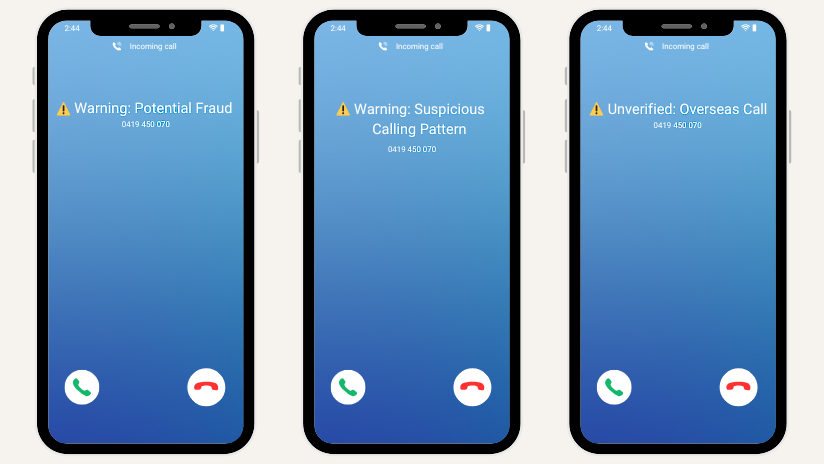
Examples of scam call warnings from Telstra Scam Protect
What the warnings mean
You may see one of these messages on your screen:
- Warning: Potential Fraud, for calls that may be fraudulent, including suspected spoofed numbers or suspicious calling patterns.
- Warning: Suspicious Calling Pattern, when Telstra detects unusual calling behaviour often linked to spam or scam activity.
- Unverified: Overseas Call, when a call appears local but is detected as originating from overseas and may be suspicious.
Telstra Scam Protect only applies warnings to some calls identified as suspicious. It cannot guarantee every scam call will be flagged, so it is still important to stay alert.
Additional protection tools
Telstra Scam Protect works alongside other tools designed to help keep your devices and information safer.
Device Security Essentials
A free security feature available in the My Telstra app that helps protect your phone from malware, phishing attempts and unsafe websites.
Add extra protection with Device Security Essentials
Scam Indicator
A feature that can provide additional context during situations that may involve scam activity.
Learn how Scam Indicator works
Passkeys
A more secure way to sign in to your Telstra account using your device instead of passwords, helping reduce the risk of phishing and account take‑over scams.
Protect your account with passkeys
How to recognise a scam call
A call may be a scam if it:
- is unexpected and pressures you to act immediately
- asks for passwords, PINs or one-time codes
- requests payment in usual ways
- tells you to click a link or install software
- pressures you not to hang up or verify the details another way.
If something doesn't feel right, trust your instincts. It's okay to pause and end the call.
What to do if you receive a suspicious call
If a call feels suspicious:
- hang up
- do not share personal or financial information
- do not click links or install apps suggested during the call
- contact the organisation directly using details from its official website or app.
If you later realise you may have shared information or been affected by a scam, follow the step‑by‑step guidance in If you’re worried you’ve been scammed.
You can help stop scam activity, by reporting a scam to Scamwatch. If what you received isn't listed, you can report a scam using Telstra’s online form..
Simple ways to reduce scam calls
Using Telstra’s built‑in protection tools alongside safe habits can help lower your risk.
You can:
- let unknown numbers go to voicemail
- take time to verify who is calling
- keep your phone software up to date
- stay informed about current scam tactics.
Take the next step to stay protected
Protecting yourself from scam calls starts with recognising the warning signs early and having the right protections in place. Telstra Scam Protect helps by giving you extra context before you answer, while other Telstra security features can help reduce risk across your devices and accounts.
Take a moment to review your security settings and explore ways to strengthen your protection across calls, messages and online accounts.