Upfront Plan support
We’re moving your services to Upfront Plans
When you move to an Upfront Plan, there will be changes to international calling, international roaming, data sharing and how you’ll pay.
Please read this page carefully to understand what’s happening. We've sent you an email with more information on which of your services are moving to Upfront Plans.
Please read this page carefully to understand what’s happening. We've sent you an email with more information on which of your services are moving to Upfront Plans.

What's happening?
We’re moving your mobile and data services to our Upfront Plans, which are on a new system. This will simplify our services so we can provide better support to you.
We want to make sure you're informed about these changes, so we’ve provided notice at least 30 days before they happen. Our Upfront Plans don’t lock you into a contract. If these changes don’t suit your needs, you can change your plan or cancel your service.
Plan price, data or speeds won't change with this move
Plan prices may be subject to change in the future due to other factors.
What's changing?
When your mobile and data services move to an Upfront Plan, there will be changes to international calling, international roaming, data sharing and how you’ll pay.
Please note: Plan price, data or speeds won’t change with this move. Plan prices may be subject to change in the future due to other factors.
all upfront plans
The way you pay
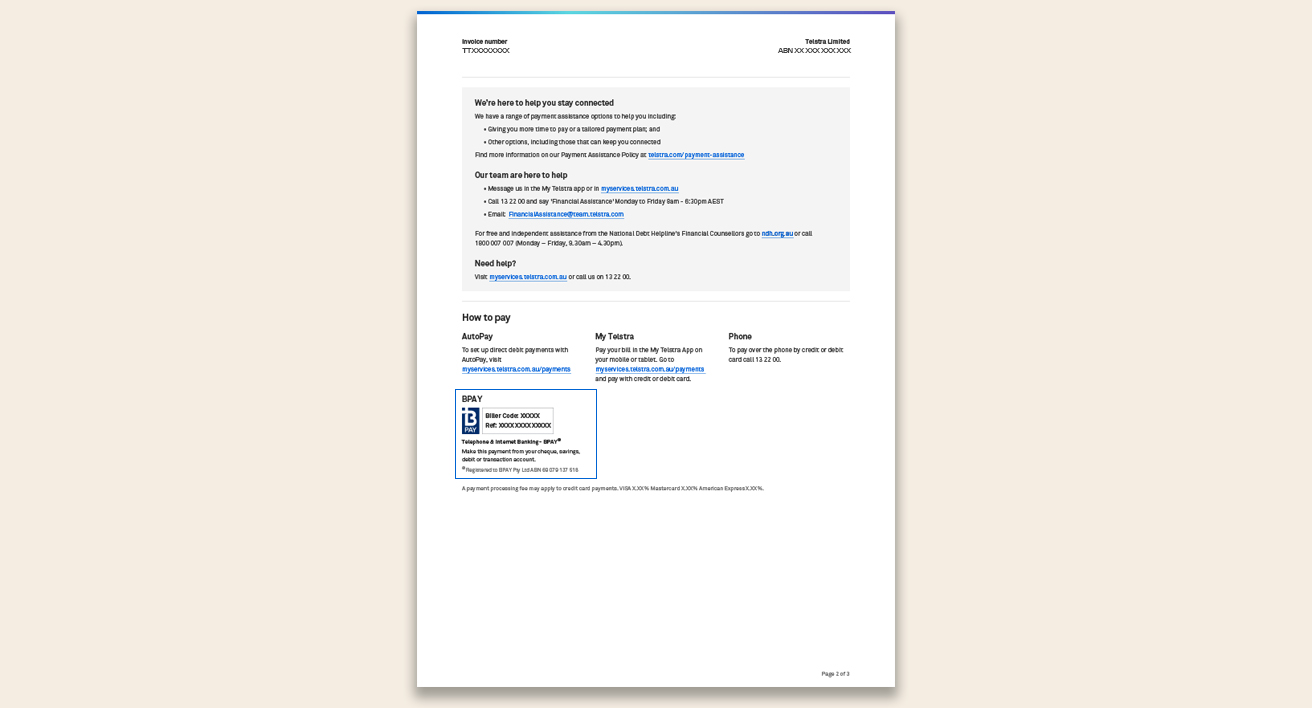
With no extra data charges and a set monthly cost, you’ll pay for all your Upfront Mobile & Data Plans in advance. You’ll receive a new-look Telstra bill at the start of the billing period and have 10 business days to pay.
If you cancel your new Upfront Plan, there are no early cancellation charges. You’ll need to pay until the end of your current billing month.
all upfront plans
BPAY details will change
If you pay via BPAY: For your new plan, your BPAY Biller Code will be 425132, and you'll have a new BPAY Reference Number on your next bill. Once you move to an Upfront Plan, you'll need to start using the new BPAY details to pay for your plan.
Upfront Mobile & Data Plans
Data sharing
Share your data between up to 20 eligible upfront mobile or data (Mobile Broadband) plans on the same account in Australia.
Upfront Mobile & Data Plans
International roaming
Roam in selected destinations by buying an International Roaming Day Pass, which will be automatically enabled unless switched off in the My Telstra app.
Upfront mobile plans
International calling
Upfront Mobile Plans include 30 minutes of calls to standard international numbers.
How you pay: You’ll get a new-look Telstra bill
You'll get a new-look Telstra bill for your upfront services through a paper bill by post each month and you'll now have 10 business days to pay your bill. This payment will cover you for the month ahead. You'll be able to find your bill in the My Telstra app or My Telstra in a browser once it's been issued. You can also update your paper bill preference in the My Telstra app if this is no longer required.
Please note: You'll get multiple bills for your mobile & data plans in the first month when you switch to Upfront Plans.
If you have other services not moving to Upfront Plans:
You may have other services on your account that aren’t moving to our new system at this time. If this is the case, you’ll continue to receive multiple bills each month – one for services that have moved to an Upfront Mobile or Data Plan, and another for services that haven’t moved. These bills need to be paid separately using the payment methods reflected on each bill.
You can pay your bill with:
Credit/debit card
Use a credit or debit card (Visa, MasterCard or Amex) in the My Telstra app or My Telstra in a browser.
New BPAY Biller Code: 425132
Pay via BPAY using your new Biller Code: 425132 and unique Bill Reference number.
Learn more about your new BPAY details
Australia Post
Pay at Australia Post (additional fees may apply), using your new Biller Code or QR code. You can pay with cash, a debit card and via EFTPOS.
If all your services are moving to Upfront Mobile or Data Plans, we’ll send you a final bill for your old account.
Got credit on your old account?
If your final bill has a credit balance:
- under $2000: we’ll transfer it automatically, and it will appear on your new Telstra bill within 2 billing periods.
- over $2000: call us.
Still owe an amount on your old account?
If your final bill has a debit balance, this will be transferred to your new Telstra bill. Please pay the Telstra bill before the due date to avoid any disruption to your services
Here’s how your monthly payments will work:
We'll move your mobile & data plans onto Upfront Plans
All your mobile & data plans will move to our new system on Upfront Plans. They have a set monthly cost, so you'll always know what you're paying. You’ll get a bill for your Upfront Plans in advance.
If you have other services not moving to Upfront Plans
You may have other services on your account that aren’t moving to our new system at this time.
If this is the case, you’ll continue to receive multiple bills each month – one for services that have moved to an Upfront mobile plan, and another for services that haven’t moved. These bills need to be paid separately using the payment methods reflected on each bill.
Paying with two BPAY Biller Codes
If you pay your bills via BPAY, you'll need to use separate Biller Codes for your current bill and your new Telstra bill.
For any services that are still on your current bill, you'll continue to use your current Biller Code (7799 or 7773). For Upfront Plans on your new Telstra bill, you'll pay using the BPAY Biller Code 425132.
Multiple bills in the first month
During the switch to Upfront Plans, you’ll receive multiple bills for your mobile & data plans in the first month.
These payments cover different billing periods:
- A bill for your old mobile & data plans covering the previous billing period.
Please note: this bill will include any remaining roaming charges you need to pay. - Your first bill for the new Upfront Mobile & Data Plans, covering the month ahead.
We're here to support you during this change
If you believe that this change may cause financial stress, you can request a payment extension after you move to an Upfront Plan.
Frequently asked questions
Financial assistance
You can explore our payment assistance options if you’re having difficulty paying or your circumstances have changed.
Manage your plan
Upfront Plans are not in a contract. All our plans are month-to-month, meaning you can change you plan once a month or cancel your services in the My Telstra app or My Telstra in a browser at any time.
To change your plan or to cancel your service:
- Go to Services and choose your service
- Select View or manage your plan
- Follow the prompts to change your plan or cancel your plan.
If you cancel, there are no early cancellation charges. You’ll need to pay until the end of your current billing month.
Our updated plans have MessageBank activated. To turn MessageBank off on your mobile, please follow the instructions below.
- Open the My Telstra app or My Telstra in a browser
- Navigate to Services and select your service
- Tap the three dots in the top right-hand side
- Select Manage your MessageBank to make changes
- Swipe the MessageBank toggle to off and then tap Update settings.
Go to our MessageBank for mobiles support page to find out more about MessageBank.
Payments and billing
If you’re on a paper bill, you’ll continue to get one after you move to an Upfront Plan. You can change your preference in the My Telstra app or My Telstra in a browser if a paper bill is no longer required.
If your service has been restricted due to non-payment, the quickest way to get it back up and running is to tell us you've paid.
To let us know you've paid:
- Sign in to My Telstra and go to Payments,
- Select Payment already made and follow the prompts.
Once you've let us know, any restricted services should be fully restored in 10 minutes, but it could take up to 1 hour.
Yes, you can make partial payments towards a Telstra bill for your Upfront Plans. To do this:
- Sign into My Telstra and go to Payments
- Select Pay now
- Choose Other amount
- Enter the amount you’d like to pay.
Yes, you can extend the next payment date after you move to an Upfront Plan or service. To do this:
- Sign into My Telstra and go to Payments
- Select the card with your upcoming AutoPay payment details
- Select Having trouble paying
- Select Payment extension and follow the prompts.
You can only extend consecutive payments if you’ve paid the previous extension in full.
Data usage
This plan comes with a data allowance to use in Australia. You won’t be charged if you go over your monthly data allowance. Instead, you can continue to access data up to speeds of 1.5Mbps. 1.5Mbps isn’t suitable for HD video or high-speed applications, and means that some web pages, social media content and files may take longer to load. In addition, heavy data users (users in the top 1% of all data users) may experience slower speeds than other users during busy periods. The speeds you actually receive may vary depending on a range of factors including your device, location, number of users and download sources. Your data allowance is for personal use in a smartphone or tablet in Australia only and the FairPlay Policy applies.
Need help?
Online Support
Get information from our frequently asked questions.
Helping you when times are tough
Depending on your level of urgency, we have flexible options that can help keep you connected.
Get in touch
We're here and ready to help.